
The MfaWebAuthnRoamingEnrollment screen class provides methods associated with the mfa-webauthn-roaming-enrollment screen. This screen is displayed when a user needs to enroll a WebAuthn roaming authenticator, for example: a security key.
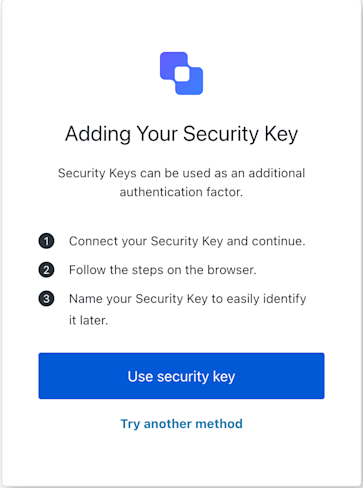
MfaWebAuthnRoamingEnrollment

Constructors

Create an instance of MfaWebAuthnRoamingEnrollment screen
Example
import MfaWebAuthnRoamingEnrollment from '@auth0/auth0-acul-js/mfa-webauthn-roaming-enrollment';

const webauthnEnrollment = new MfaWebAuthnRoamingEnrollment();
// Assuming you have obtained the WebAuthn credential response (e.g., from navigator.credentials.create)
const credentialResponse = { /* ... serialized credential ... */ };
await webauthnEnrollment.enroll({ response: JSON.stringify(credentialResponse) });

Properties

branding
Provides branding-related configurations, such as branding theme and settings.
client
Provides client-related configurations, such as id, name, and logoUrl.
organization
Provides information about the user’s organization, such as organization id and name.
prompt
Contains data about the current prompt in the authentication flow.
screen
Contains details specific to the mfa-webauthn-roaming-enrollment screen, including its configuration and context.
tenant
Contains data related to the tenant, such as id and associated metadata.
transaction
Provides transaction-specific data, such as active identifiers and flow states.
untrustedData
Handles untrusted data passed to the SDK, such as user input during login.
user
Details of the active user, including username, email, and roles.

Methods

enroll
(options ?)
This method initiates the WebAuthn credential creation and submits the result to the server. This corresponds to the user interacting with the FIDO Security Keys prompt.
Example
import MfaWebAuthnRoamingEnrollment from '@auth0/auth0-acul-js/mfa-webauthn-roaming-enrollment';

const webauthnEnrollment = new MfaWebAuthnRoamingEnrollment();
// Assuming you have obtained the WebAuthn credential response (e.g., from navigator.credentials.create)
const credentialResponse = { /* ... serialized credential ... */ };
await webauthnEnrollment.enroll({ response: JSON.stringify(credentialResponse) });
options
OPTIONAL
Optional custom parameters to be sent with the request.
getErrors
This method retrieves the array of transaction errors from the context, or an empty array if none exist.
showError
(options ?)
This method submits details about a WebAuthn browser error to the server. This is used when the browser’s WebAuthn API encounters an error.
Example
import MfaWebAuthnRoamingEnrollment from '@auth0/auth0-acul-js/mfa-webauthn-roaming-enrollment';

const webauthnEnrollment = new MfaWebAuthnRoamingEnrollment();
await webauthnEnrollment.showError({
  error: {
    name: 'NotAllowedError',
    message: 'The operation either timed out or was not allowed.',
  },
});
options
OPTIONAL
Contains the error object (with name and message properties from the browser’s WebAuthn API DOMException) and any other custom options.
tryAnotherMethod
(options ?)
This method allows the user to try another MFA method.
Example
import MfaWebAuthnRoamingEnrollment from '@auth0/auth0-acul-js/mfa-webauthn-roaming-enrollment';

const webauthnEnrollment = new MfaWebAuthnRoamingEnrollment();
await webauthnEnrollment.tryAnotherMethod();
options
OPTIONAL
Optional custom parameters to be sent with the request.