

How are you affected?
End-users logging in to client applications that already specify or plan to specify a custom URI scheme or loopback URI callback may be required to explicitly confirm the login by interacting with the new login confirmation prompt. Your end-users may perceive this change as a declining user experience. Additionally, authentication requests includingprompt=none will be rejected when Applications use non-verifiable callback URIs and are configured to use the new login confirmation prompt.
Migration tasks
Auth0 strongly recommends transitioning to HTTPS-based callbacks using Android App Links and Apple Universal Links whenever possible for all native applications using the Authorization Code Flow. Furthermore, in tenants where the default behavior changes after April 28, 2026, you should explicitly select the behavior you require for authentication requests using custom URI schemes or loopback URI callbacks ahead of the system default change.Review whether your applications are using Non-Verifiable Callback URIs
In tenants for which the Unconfirmed Login with Non-Verifiable Callback URI Redirects migration toggle is available and in an enabled state, authentication requests specifying a custom URI scheme or loopback URI will generate a deprecation notice tenant log unless you have explicitly set the following option at the application or tenant level:skip_non_verifiable_callback_uri_confirmation_prompt
These tenant logs contain the client identifier of the application performing the request. You can monitor these tenant logs through the Auth0 Dashboard using the following query:
Opt in to new login confirmation prompt
To opt-in to the new login confirmation prompt ahead of time and enhance security for authentication flows using custom URI schemes or loopback URIs, complete the following steps through your Auth0 Dashboard:- Navigate to Auth0 Dashboard > Tenant Settings > Advanced.
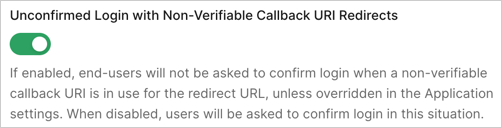
- In the Migrations section, turn off the Unconfirmed Login with Non-Verifiable Callback URI Redirects toggle.
Opt out of new login confirmation prompt
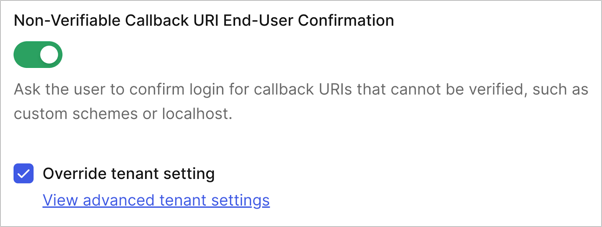
If, after evaluating the security considerations, you decide against using the new login confirmation prompt, you can configure specific applications or the whole tenant to opt out of the new behavior. You can do so through your Auth0 Dashboard. The application-level setting takes precedence over the tenant-level setting. Ensure you configure application-specific settings before changing the tenant-level setting to avoid unintended behavior changes. For example, you may want to skip the Non-Verifiable Callback URI End-User Confirmation for some specific applications while, by default, showing it for other applications, or vice versa. To opt out for specific applications:- Navigate to Auth0 Dashboard > Applications > Settings > Advanced Settings > OAuth.
- Locate and disable the Non-Verifiable Callback URI End-User Confirmation toggle and select Save. You may need to select the Override the tenant setting option to permanently allow managing this configuration.
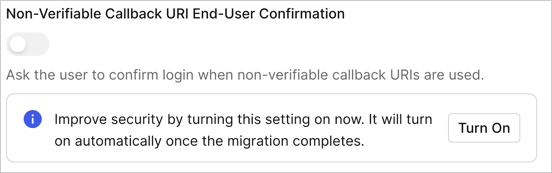
- Navigate to Auth0 Dashboard > Tenant Settings > Advanced.
- Locate and disable the Non-Verifiable Callback URI End-User Confirmation toggle within the Login and Logout section and select Save. You may need to select Turn on to allow permanently managing this configuration.
- Tenant-Level Configuration: You can manage the confirmation prompt behavior by setting the
skip_non_verifiable_callback_uri_confirmation_promptproperty via the Update Tenant Settings endpoint. - Application-Level Configuration: To override the tenant-level setting for specific applications, set the same
skip_non_verifiable_callback_uri_confirmation_promptproperty via the Update Client endpoint.